





Ubuntu MythTV iPhone and iPad remote
Posted in "News"
Source:http://www.mythtv.org/wiki/Frontend_control_socket
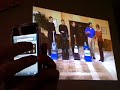
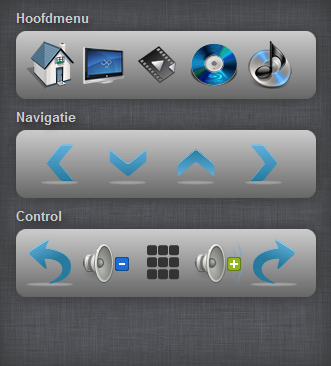
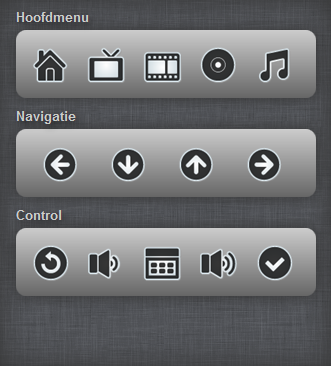
If you the owner of an iPhone, another type of smart-phone or even an iPad, it could come in handy to have them to act as a remote control for your MythTV installation based on Ubuntu (this works on MythBuntu too!). I was planning to write some sort of remote control until I stumbled on the code of Kyle Stoneman. He had written a HTML interface and used Python to fulfil the telnet command part which is needed to control MythTV. This worked as a charm but the code was a little outdated.
Since I like working with PHP and I see more possibilities using this language instead, for instance connecting to the MythTV MySQL back-end to read out recordings or receiving program info, I have rewritten the code with PHP and optimized it for use with other smart-phone devices. The optimized front-end code now works with XHTML and CSS3 and is tested on an iPhone 4 and iPad 2 and works perfect!
Download the mythremote here! You can open it using File Roller in Ubuntu or Archive Utility in Mac OSX or WinRAR in Windows.
To install the mythremote you need to make sure Apache2 and PHP5 is installed on your MythTV system. If your MythTV front-end installation is installed on the same box as your back-end and you have mythweb running, you are already good to go and you can skip to "3. Copy mythremote to the Apache directory". If you have a separated back and front-end then you need to install Apache2 and PHP5 to your front-end box, follow the instructions below.
1. Check if Apache and PHP is installed:
You can check if Apache and PHP are installed by entering the following command in the terminal on the front-end:
sudo dpkg --list|grep -e httpd -e apache -e php5You should get a list of packages as following:
ii  apache2                   2.2.14-5ubuntu8.7     Apache HTTP Server metapackage
ii  apache2-mpm-prefork       2.2.14-5ubuntu8.7     Apache HTTP Server - traditional non-threade
ii  apache2-utils             2.2.14-5ubuntu8.7     utility programs for webservers
ii  apache2.2-bin             2.2.14-5ubuntu8.7     Apache HTTP Server common binary files
ii  apache2.2-common          2.2.14-5ubuntu8.7     Apache HTTP Server common files
ii  libapache2-mod-php5       5.3.2-1ubuntu4.10     server-side, HTML-embedded scripting languag
ii  php5                      5.3.2-1ubuntu4.10     server-side, HTML-embedded scripting languag
ii  php5-cli                  5.3.2-1ubuntu4.10     command-line interpreter for the php5 script
ii  php5-common               5.3.2-1ubuntu4.10     Common files for packages built from the php
ii  php5-curl                 5.3.2-1ubuntu4.10     CURL module for php5
ii  php5-gd                   5.3.2-1ubuntu4.10     GD module for php5
ii  php5-mysql                5.3.2-1ubuntu4.10     MySQL module for php5
Look for "ii" beside the package name, indicating it's installed. Check the Ubuntu manual about PHP for more information.
2. Install Apache and PHP:
If Apache or PHP isn't installed, you need to install it off course. Open a terminal and use this command to prepare your front-end box with Apache and PHP:
sudo apt-get install apache2 php5 libapache2-mod-php5 php5-cli php5-mysql php5-gd php5-curlAfter this you need to restart Apache or you could deal with issues like the PHP module not working properly:
sudo service apache2 restartYou will see a message when Apache is restarting:
* Restarting web server apache2 ... waiting [ OK ]
3. Copy mythremote to the Apache directory:
If you didn't download the remote yet, you can download it here. Now unpack "mythremote.tar.gz" and copy the "mythremote" directory with contents to the Apache directory "/var/www/" on the front-end box. If you do this via SSH from another machine, you need to be sure to have all proper rights to the Apache directory, when copying the files directly from the front-end itself to the Apache directory, you need to open the file manager with root rights. On MythBuntu you can do this by entering following command in the terminal:
sudo thunarOn a Ubuntu front-end we do this with Nautlius:
sudo nautilusNow copy the "mythremote" directory to "/var/www/".
4. Prepare MythTV to be able to receive remote commands:
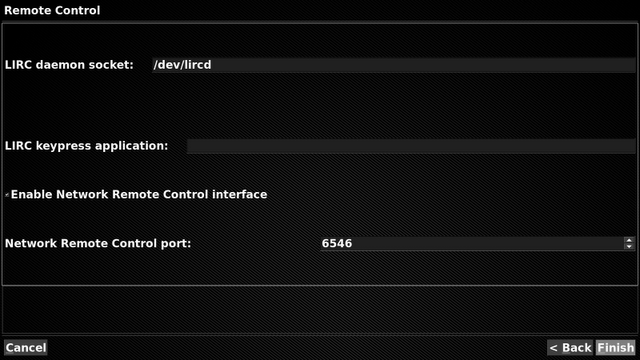
To be able for your MythTV front-end to receive telnet commands, you must enable it in the front-end setup. Start mythfrontend and choose Utilities > Setup > General > Remote Control. Check the box "Enable Network Remote Control interface" and click finish to apply.
5. Testing:
Open a browser on the front-end machine and navigate to:
http://localhost/mythremote/or
http://127.0.0.1/mythremote/ You should see the remote appearing. If you want to test using your iPhone, iPad or another smartphone, use this link instead:
http://<your_mythtv_ip_address>/mythremote/Additional information -> You can choose from 4 templates if you edit config.inc.php. This should be all. If you have any questions, just mail them using the contact form. And remember when you're having trouble, most information can be found searching the Ubuntu Forums or try Googling it!